On this page
- What makes an AI cat video work
- Step 1: Pick one cat and one gag
- Step 2: Write the prompt for your AI cat video
- Step 3: Choose a look for your AI cat video
- Step 4: Make the AI cat video in Fableclip
- Step 5: Turn one cat into a series
- Talking cats, dancing cats and other AI cat formats
- Do you need to label AI cat videos?
- Common problems when you make AI cat videos
- Putting it into action
If you're working out how to make AI cat videos, the good news is that you don't need a cat, a camera or an editing app. The catch is that a lot of tutorials have you hop between three or four free tools — one to draw the cat, one to animate it, one to cut it together — and almost none of them tell you how to make the next video look like the same cat.
This guide covers both halves. It walks one clip from idea to finished video in Fableclip, with ten prompts you can paste, and then shows how to turn that cat into a series that keeps the same face, fur and outfit from one episode to the next.
The short version of how to make AI cat videos: pick one cat and one gag, write the gag as a single sentence, choose a video style, make the clip, and if it works, set the cat up as a character in a series so every episode looks the same.
What makes an AI cat video work
The classic AI cat video runs on a simple engine: a cat doing something a person would do, played completely straight. The cat cooks, works a shift, sits in a meeting, judges a contest. The joke lives in the gap between how seriously the job is taken and the fact that it's a cat doing it.
Three things keep that joke readable on a phone:
- One gag per clip. A clip that tries to fit three jokes lands none of them. One action and one turn is plenty.
- A cat that acts like a person. Paws doing hand things, a face that reacts. That's what keeps people watching to the end.
- A vertical, phone-shot frame. Cat clips live on TikTok, Shorts and Reels, and framing that looks like someone filmed it on their phone fits the feed.
Fableclip's AI Cats video style is built around the same three ingredients: a funny human-like action, expressive paws, phone-shot vertical framing and a gag you get instantly. That has a practical upside you'll use in Step 2 — the style already carries the look, so your prompt only has to carry the joke.
Step 1: Pick one cat and one gag
Before you write anything, decide who your cat is. Not "a cat," but a specific one: the build, the fur color and pattern, the eye color, and at most one thing it wears. "A chonky orange tabby with green eyes and a tiny diner apron" is a character. "A cute cat" is a different cat every time you press generate.
This matters more than it looks. If you only ever make one clip, the description only has to work once. But if that clip does well, you'll want the same cat back for the second one, and the only reliable way to get it is to reuse the same words. Write the description down somewhere you'll find it again.
Then pick the gag. The ones that work best are small:
- A cat doing a human job — waiter, barista, weather presenter, detective.
- A cat meeting an ordinary thing for the first time — snow, a treadmill, a laptop.
- A tiny disaster handled with total dignity — the wrong order served with pride, the parcel that won't fit through the door.
Each of these has an ending built in, and that ending is the last thing you'll write in the prompt.
Step 2: Write the prompt for your AI cat video
The prompt is one or two sentences, and it has four parts:
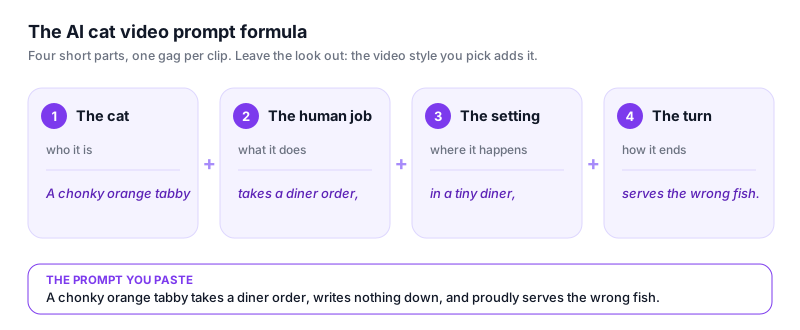
- The cat — the exact description from Step 1.
- The human job — what it's doing, as a verb: takes an order, presents the weather, carries a parcel.
- The setting — one place, kept simple: a tiny diner, a news studio, a stairwell.
- The turn — how the moment ends. It's the punchline, so it goes last.
What you leave out matters just as much. Don't describe the look ("photorealistic, cinematic lighting, 4K") in the content box. In Fableclip, the video style you choose is added to your prompt when the clip is generated, so the content box can stay about the scene. Stacking look words on top tends to pull against the style you picked.
Here are ten prompts built that way. Paste one as it is, or swap in your own cat.
- The waiter. A chonky orange tabby in a tiny diner apron takes a customer's order, writes nothing down, and proudly serves the wrong fish.
- The meeting. A grey British Shorthair in a tiny necktie sits at the head of a meeting table and slowly pushes a coffee mug off the edge, holding eye contact with the camera.
- The yoga class. A fluffy white cat copies a yoga video on a laptop, nails every pose, then falls asleep in the last one.
- The delivery. A black cat in a delivery cap drags a parcel bigger than itself up the stairs, gets stuck in the doorway, and squeezes through with a dramatic sigh.
- The judge. A calico cat judging a cooking show tastes three dishes, frowns at two, and pushes the third one back for more.
- The weather report. A tabby cat presents the weather in front of a map, gets distracted by the moving cloud graphic, and pounces on it.
- The first snow. A tiny kitten sees snow for the first time from a doorway, taps it with one paw, and sprints back inside.
- The gym. A round ginger cat walks on a treadmill at the slowest speed, nibbling a tiny croissant, then gives the camera a thumbs-up paw.
- The detective. A tuxedo cat detective with a magnifying glass follows paw prints across the kitchen floor, only to find they lead back to itself.
- The barista. A Persian cat barista pours latte art with total focus, steps back proudly, and the foam is shaped like a fish.
Every one of them ends on the turn. If a clip comes back without its ending, the setup was probably too long for the clip: cut words from the middle, never from the turn.
Step 3: Choose a look for your AI cat video
The look decides how the joke feels before anything has happened. In Fableclip's AI Animation it's the Video style row, and a style preview shows what the one you've selected looks like.
- AI Cats is made for exactly this: a photorealistic cat with human-like behavior, framed like a phone video. Start here for job gags and tiny disasters.
- Disney gives a polished, family-friendly 3D look with big expressive eyes. It suits sweet moments and kitten adventures.
- Storybook and Ghibli are painted and warm. They're better for gentle stories than for slapstick.
- Cozy Felt and Paper Doodle turn the cat into a felt puppet or an ink doodle — unusual choices that can stand out in a feed full of realistic cats.
- Custom lets you describe your own look in a sentence. Describe how the picture looks — colors, texture, lighting — and leave who's in it to the content box.
Whatever you pick, keep it for the whole series. Switching styles between clips is the quickest way to make the same cat look like a stranger.
One more thing to know before you choose: platforms treat a realistic-looking cat and an obvious cartoon differently. If you go photorealistic, plan to label the video as AI. There's a section on that further down.
Step 4: Make the AI cat video in Fableclip
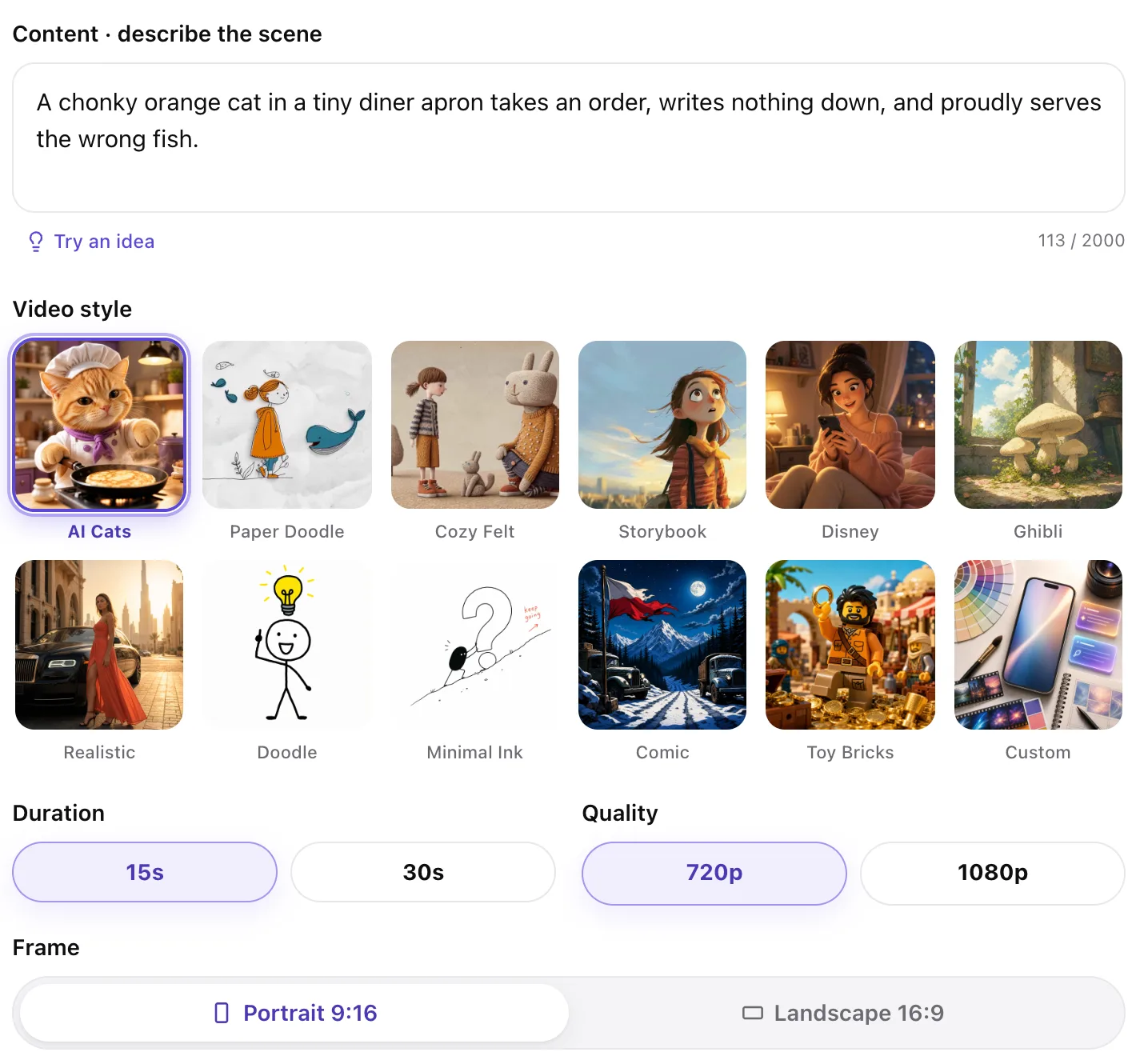
Open AI Animation and work down the page:
- Content · describe the scene. Paste your prompt. If you're stuck, Try an idea drops in an example you can start from.
- Video style. Pick the look from Step 3.
- Duration and Quality. One gag fits comfortably in the shorter duration. Choose the higher quality for clips you plan to post.
- Frame. Keep Portrait 9:16 for TikTok, Shorts and Reels.
- Smart reference (optional). Add an image and the AI follows its subject and composition. This is how you make an AI video of your own cat: upload a clear, well-lit photo of them.
Then press Generate video. A clip takes a few minutes, and you don't have to wait on the page. When it's done you can download it, or make another with one thing changed.
AI Animation is a member feature, and the panel tells you how many video slots a clip will use before you press the button. For a closer look at what this tool makes — and what it doesn't — see the AI cat video generator page.
Step 5: Turn one cat into a series
One good cat clip can be luck. A cat channel is the same cat, again and again, until viewers recognize it in the first second. That's the hardest part of learning how to make AI cat videos, and it's where most free-tool workflows break down: every new clip starts from scratch, so the cat drifts — a different shade of orange, a different face, the apron gone.
Fableclip's Animated Series is built for this. You can describe the show in one sentence and let it draft the setup, or choose Start from scratch and fill it in yourself. Either way, three parts of the setup do most of the work.
The schedule. Pick how often a new episode is made: On demand, 3× / week, Daily, 2× / day or Custom. You set the length, resolution and frame once, alongside it, and every episode follows them. You can also choose where finished episodes get published.
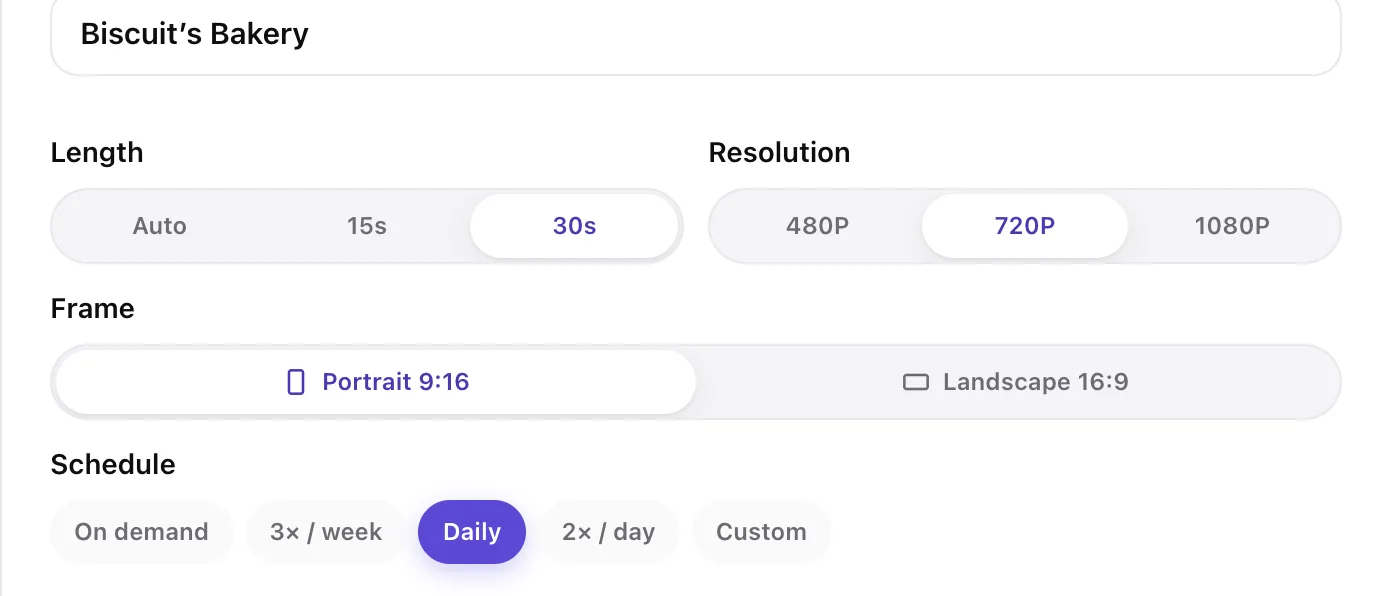
How each episode is written. This is the rule for the whole show: the theme, how one episode relates to the next, and anything that must never appear. Give a cat series a shape it can repeat. "Every episode, a new customer orders something impossible. Biscuit sighs, tries, fails once, then pulls it off at the last second" is a show. "Funny cat videos" isn't.
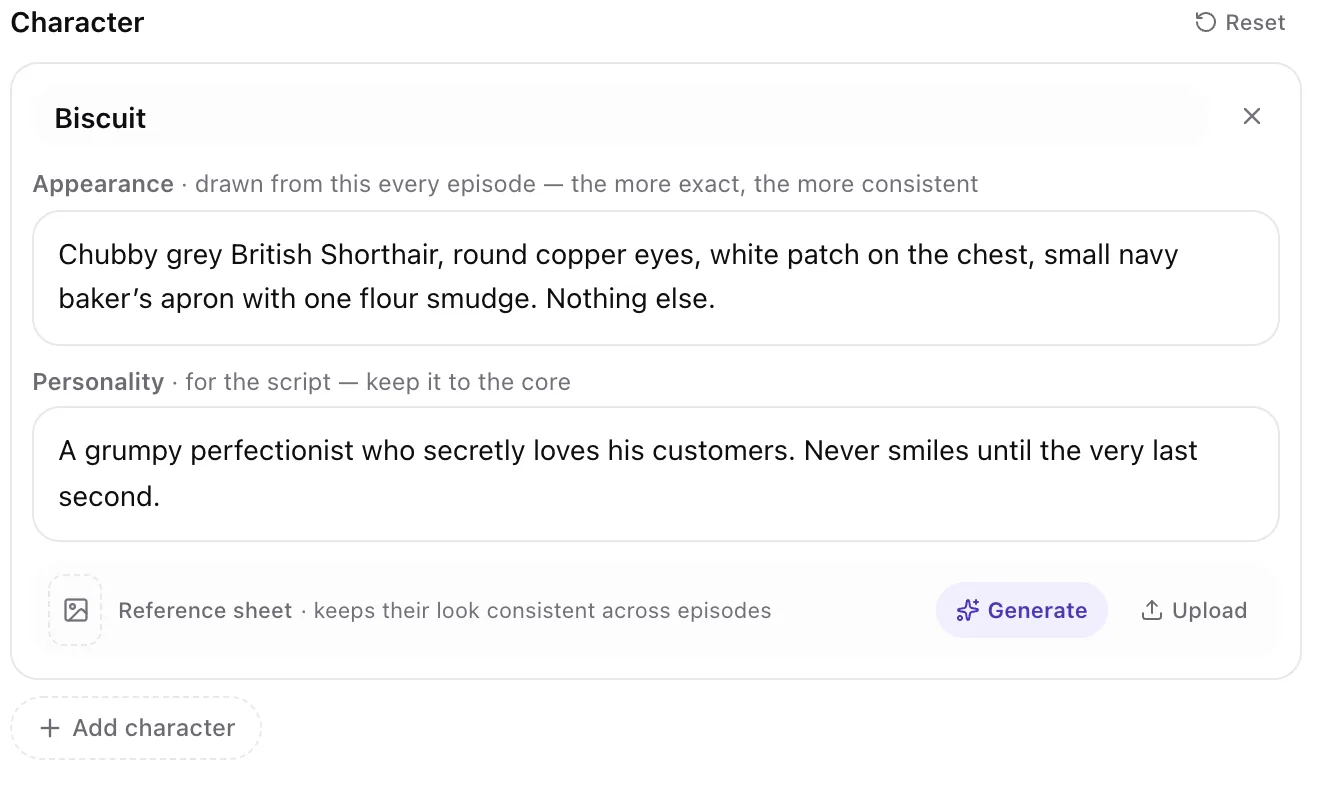
The character. This is where the cat stays the same. Give it a name and an Appearance, which is drawn from in every episode — so the more exact it is, the more consistent the cat. Write down the things that must not drift: build, exact colors, eyes, markings and the one accessory. Personality goes to the script, so keep it to the core of who the cat is. Then generate or upload a Reference sheet, which keeps the cat's look consistent across episodes.
Before any video is made, Preview episode 1 writes the first episode so you can read it, and the preview uses no video slots. Read it the way you'd read a script: does the cat have one clear job, and does the episode end on a turn? If not, change the rule and preview again. Our step-by-step guide to faceless videos covers the same habit for narrated series.
Talking cats, dancing cats and other AI cat formats
Job gags are the easiest place to start, but they aren't the only kind of AI cat video. A few other formats work differently, and each one needs something else.
Talking cats. This format is built on dialogue: a cat podcast, a cat roast, a courtroom where the cat is on trial for knocking a vase off the shelf. Here the joke is in the lines, so you need a script, voices and mouths that match them. ClipTalk writes a talking-cat script for free from a format like a cat podcast, roast or court, then renders a Pixar-style video with lip-synced voices, captions and music.
Dancing cats. The dancing-cat clips that go around are usually made by animating a photo of a cat so it follows a dance video. That's a different method from generating a scene out of a sentence, which is what this guide covers.
Cat stories. Slower, sweeter videos — a kitten's first day outside, a bedtime story about a cat who can't fall asleep — work well as narrated stories with soft pictures. The bedtime story video page shows how Fableclip makes that kind of gentle animal story.
Do you need to label AI cat videos?
If the cat looks real, yes. If it's clearly a cartoon, the rules usually leave it up to you — and labeling it anyway rarely hurts.
YouTube asks creators to disclose AI-generated or altered content "that seems realistic". The same help page says creators don't need to disclose non-realistic content made with AI, and lists "an AI-generated or altered animation of a missile in a fully animated video" as one example. When TikTok launched its AI-generated content label, it spelled out that its policy "requires people to label AI-generated content that contains realistic images, audio or video," with the label or another disclosure such as a sticker or caption.
So a photorealistic cat flipping pancakes needs the label. A felt-puppet cat doesn't strictly need one.
There's a reason that has nothing to do with rules, too. In a BBC Future piece on AI animal videos, Jessica Maddox, an associate professor of media studies at the University of Georgia, says that an unlabelled AI video can feel like a set-up. In her words: "The joy feels manufactured." The same piece describes people diving into the comments to find out whether a clip was real before they let themselves enjoy it. A cat that's openly AI and worth coming back for is a sturdier thing to build a channel on than one that hopes nobody asks.
Labels and money are separate questions. If you plan to earn from your cat channel, YouTube's monetization policies exclude "AI-generated content made with generic or unoriginal templates", and our guide to making money on YouTube without showing your face goes through what that means in practice.
Common problems when you make AI cat videos
Even once you know how to make AI cat videos, some clips come back wrong. Most of the time it's one of these:
| What you see | Usually because | What to change |
|---|---|---|
| The cat looks different in every clip | The description changes from prompt to prompt | Reuse the same cat description word for word; in a series, fill in Appearance and add a reference sheet |
| The joke doesn't land | Two or three gags in one clip | Keep one action and one turn; cut the rest |
| The clip ends before the payoff | A long setup for a short clip | Cut words from the middle of the prompt, or choose the longer duration |
| The motion looks messy | Too much happening at once | One cat, one main action, one simple setting |
| The cat looks a little uncanny | A realistic look on a gag that should feel cute | Try Disney, Storybook or Cozy Felt |
| The style fights your prompt | Look words written into the content box | Take them out, or put them in Custom |
| Your own cat doesn't look like itself | No reference photo, or a busy one | Add a clear, close photo of your cat as a Smart reference |
| People ask "is this real?" | A realistic clip with no label | Label it as AI |
Putting it into action
Start with one cat and write its description once. Take the gag from your favorite prompt above, make a single clip in the AI Cats style, and watch it on your phone: does the joke land in the first few seconds? If it does, set the cat up as a character in a series and let new episodes arrive on a schedule. If it doesn't, change one thing — the gag, the turn or the look — and try again.
Ready to start? Make your first cat clip and keep this guide open for the prompts.
Frequently asked questions
How do people make those AI cat videos?
Many start from a text prompt: one sentence describing a cat doing something a person would do, which an AI video model animates into a short vertical clip. Some creators chain separate tools for the picture, the motion and the edit; others use one tool that does it in a single step. Channels that post the same cat every day also lock the cat’s look so it stays consistent.
Can I make AI cat videos for free?
Some tools have free tiers, often with watermarks, short clips or a daily limit. In Fableclip, AI Animation is a member feature, while an Animated Series lets you preview the first episode’s script for free before any video is made. Either way, refine your prompt first so you only spend credits on clips you actually mean to post.
How do I make an AI video of my own cat?
Use a clear, well-lit photo of your cat as a reference image. In Fableclip’s AI Animation, the Smart reference field makes the AI follow the subject and composition of your image, so the generated cat looks like yours. Describe the scene in the content box as usual, and keep the photo simple: one cat, close up, nothing busy behind it.
How do I keep the same cat in every AI cat video?
Write the cat’s look once — build, exact colors, eyes, markings and one accessory — and reuse it word for word. In a Fableclip series, put that description in the character’s Appearance, which every episode is drawn from, and add a reference sheet so the cat’s look stays consistent from one episode to the next.
How do you make AI cat dancing videos?
Dancing-cat clips are usually made by animating a photo of a cat so it follows a dance video or motion template. That is a different method from generating a scene from a text prompt. If you want the cat to dance to a trend, look for a tool built around a photo plus a motion template rather than a written prompt.
Can you make money from AI cat videos?
You can, but YouTube’s monetization policies exclude “AI-generated content made with generic or unoriginal templates” and templated storylines. A recurring cat character with its own personality, and episodes that each have a real joke, makes a much stronger case than mass-produced clips. Treat it as a channel you build over time, not a quick payout.
Do I have to label AI cat videos?
If the cat looks real, yes. YouTube requires disclosure of realistic AI-generated content, and TikTok asks creators to label AI-generated content with realistic images, audio or video. Clearly animated, cartoon-style cats generally don’t need a disclosure on YouTube, but labeling them anyway tends to build trust with viewers.
Turn one topic into a faceless series
Fableclip writes the script, voices it, illustrates it, captions it, and auto-publishes every episode to TikTok, YouTube and Instagram. Free video slots cover your first video.
Start a free series →